
Aging describes current outstanding balances
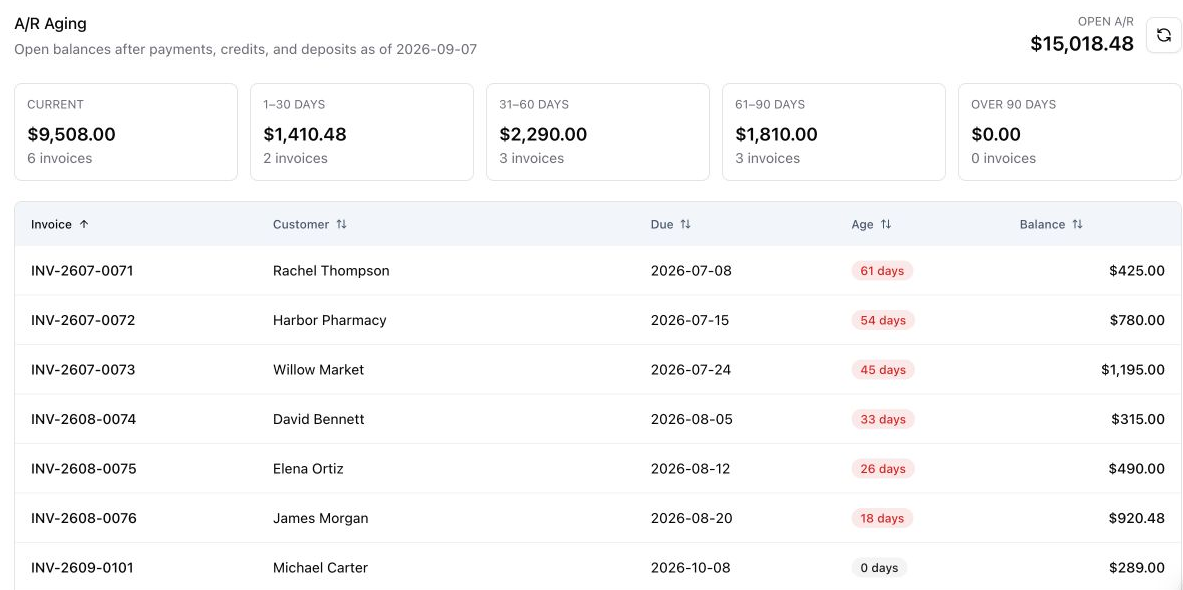
Aging uses current balances as of today in the company timezone. It does not reconstruct a historical receivables balance for a prior date.
See the work in Nexus
Find overdue invoices, email customer statements, log collections, and apply payments, credits, and deposits in Nexus.
From the first step to the next
Explore the screens your team uses and the records that keep the work connected.
Receivables and collections
Review each customer’s open invoice, due date, remaining balance, and age. Compare overdue amounts with the current bucket before opening the invoice for follow-up.
Walk through it with usTake a closer look
How do I find overdue customers, send an account statement, and record the next collection step?
Use A/R & Collections to review current customer balances and aging, generate a statement, email its PDF, and log collection activity with a follow-up date. Record payments against the correct invoice and apply available customer credits or deposits to reduce the remaining balance.
How do I find overdue customers, send an account statement, and record the next collection step?
Use A/R & Collections to review current customer balances and aging, generate a statement, email its PDF, and log collection activity with a follow-up date. Record payments against the correct invoice and apply available customer credits or deposits to reduce the remaining balance.
Open A/R & Collections and review outstanding invoices and aging buckets. Use the customer record and invoice references to identify what is still owed before contacting the customer.
Choose the customer and generate the current statement. Nexus creates a saved snapshot containing the customer balance and supporting invoice information, which can be downloaded as a PDF.
Review the recipient and add a message. Send the statement PDF from the email dialog so the customer can see the account balance in a single document.
Record the activity type, notes, outcome, priority, and follow-up date. Keep the next collection action with the customer so another office employee can continue the conversation.
When a payment arrives, select its invoice and enter the amount, method, date, and reference. In Credits & Refunds, select a customer credit or deposit and apply an amount to an open invoice for that same customer.
Refresh receivables after the payment or credit application. Check the remaining invoice balance and the unused portion of the customer credit or deposit before making another collection request.
Aging uses current balances as of today in the company timezone. It does not reconstruct a historical receivables balance for a prior date.
Credits & Refunds shows the original amount, applied amount, remaining balance, linked invoice or job, and status. The application amount cannot exceed the available customer balance or the selected invoice balance.
The Refunds view displays refund accounting records, including their status and payment reference. Use the relevant payment processor workflow when actually returning processed funds.
A few more answers
Get clear on the steps, the customer’s view, and the setup your team will need.
Yes. Generate the customer statement, review its saved balance and recipient, add a message, and send the attached PDF.
Staff can save collection notes, an outcome, priority, and a follow-up date on the customer collection record.
Yes. Choose the deposit in Credits & Refunds and an open invoice for the same customer. Apply an amount within both the available deposit and invoice balances.
The workflow described here is a staff-reviewed statement email and collection log. It does not send a collection sequence merely because an invoice becomes overdue.
Your team. Your workflow.
Bring a job your team knows well. We’ll walk through the scheduling, field work, documents, and billing that matter to your business.