
Nexus vs QuoteIQ
A QuoteIQ alternative built around the work after the quote
An approved quote is a promise your team still has to deliver. As your service business adds technicians, that promise depends on stocked trucks, clear assignments, and a plan when a repair needs another visit. Nexus brings material scanning, purchase orders, and assigned tasks into the mobile job workflow, giving your field team a way to move the work forward while the office coordinates the next step.
- Give the next action an owner and due date
- Scan job materials and keep stock in view
- Keep purchase orders attached to the work
Built for your next stage
Turn an accepted estimate into work your growing crew can finish
The pressure on a growing contractor shows up between appointments: a technician waiting for a part, a purchasing question with no job number, or a customer expecting a return call. Nexus keeps those details attached to the work. Technicians can record materials, create a purchase order with the right access, and assign a job-linked follow-up before they leave the site.
Make a successful sales process the start of a stronger operation
Winning another quote should give your business capacity to grow, not another set of loose ends for the owner. When the job requires more than the originally planned visit, somebody has to record the diagnosis, arrange materials, update the schedule, and keep the customer informed. Nexus puts the technician’s part of that process directly on the mobile job: capture materials, create a purchase order when authorized, and assign a task with the customer and job already attached.
That connected process matters more as you hire. The next technician needs the job history; the purchasing person needs to know which repair the order belongs to; dispatch needs a clear reason to schedule another appointment. Nexus keeps those records within the same platform, alongside estimates, invoicing, and project management. If your growth plan includes larger installations as well as everyday repairs, you can evaluate both workflows together. Put a real two-visit job into the demo and watch each person carry it forward, from the accepted scope to the remaining work.
How the work moves in Nexus
A quoted replacement needs a part and a second technician
The first technician records the material used and creates a purchase order from the mobile job for the remaining part. A task assigns the delivery check to the office with a due date. Once the office confirms availability, dispatch can arrange the return appointment with the technicians needed. The customer, repair details, purchasing record, and next action remain connected in Nexus.
Assign the follow-up to the office while the repair is still fresh. The task gives someone responsibility for checking the order before the technician moves on.
With the part confirmed, dispatch can coordinate the returning crew. The next technician has the original diagnosis and job details available, even if someone else attended the first visit.
See this workflow in Nexus →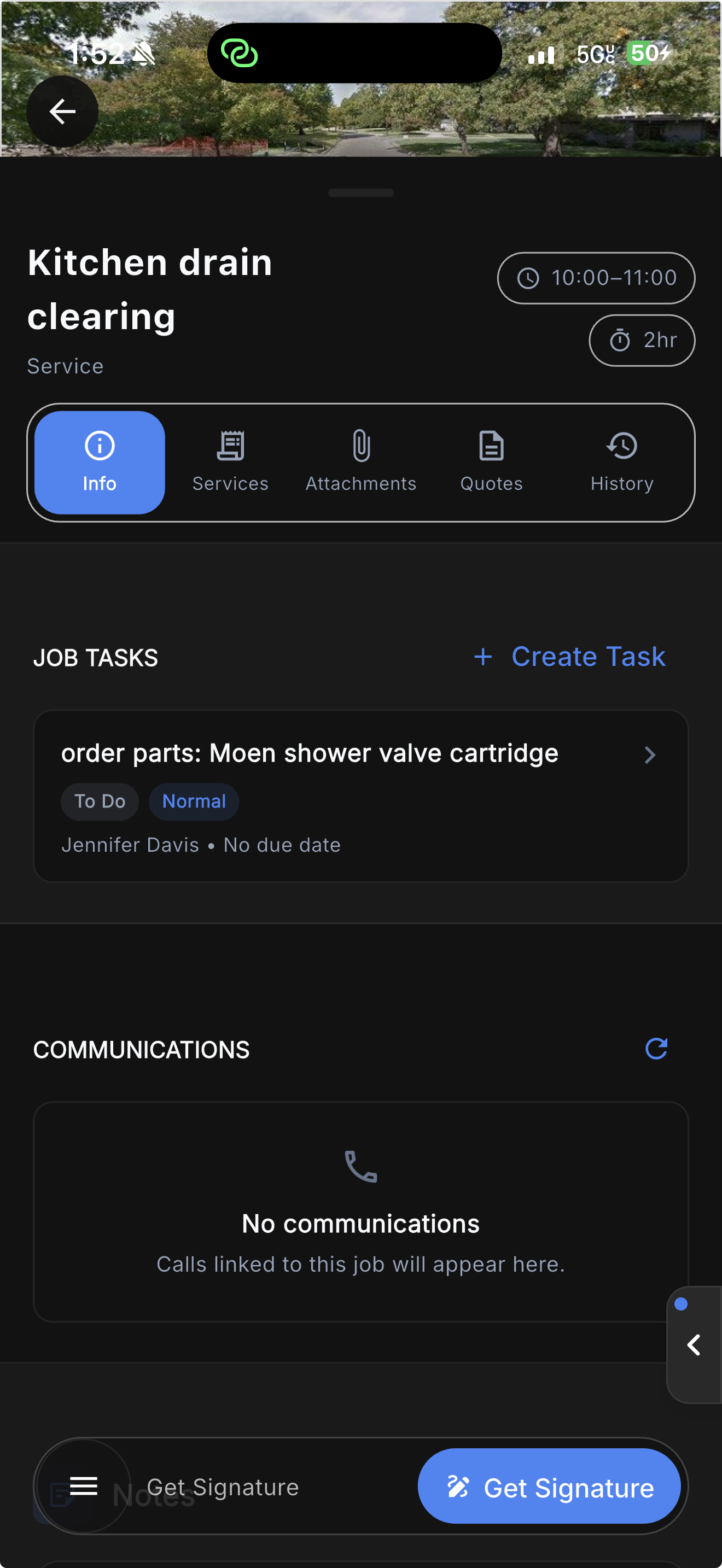
Why choose Nexus over QuoteIQ?
Give the approved job an operating plan
Connect the technician’s job to the work the office needs to do next. See the mobile app and office workspace your team uses to keep the work moving.
Give the next step an owner before leaving the job
A technician finds a part that needs ordering or a repair that needs another visit. Instead of leaving the next step in a text message, they create a task directly from the mobile job, with the job and customer already attached.
Record what needs to happen, assign the person responsible, and set a due date. A parts request, supplier check, or customer callback has a clear place in the team’s task management workflow before the technician heads to the next job.
Back at the office, the team can review the task alongside the original job details and coordinate the follow-up. When it is time to arrange a return visit, the next person has the context to keep the repair moving.
Parts requests and return-visit follow-ups have an owner, a deadline, and a job record.
Explore the Nexus field workflowReplace “someone needs to handle this” with an assigned next step
The value of task management is clear on an unfinished repair. A technician can explain what remains, assign the responsible person, and give the action a due date directly from the job. The customer and work context stay attached, so the office can understand why the task exists when it appears in the workload.
Use that process for a supplier check, a customer callback, or preparation for a return visit. It gives the business a way to distribute responsibility as the team grows. The owner does not have to be the person who remembers every open item; staff can use the recorded action and original job to decide what happens next.
Capture the parts while the technician is still on site
A part used on a repair should make it onto the job before the truck leaves. In the Nexus mobile app, technicians open material scanning from the job and record the items used. The material record stays linked to the job and invoice, giving the office the detail it needs without a second round of data entry.
Less chasing technicians for a parts list at the end of the day.
Explore inventory management
Make the material record part of completing the visit
Every unrecorded fitting, filter, or replacement part creates another question for the office. Build material capture into the technician’s on-site routine so the job carries the details while they are still easy to verify. Inventory management then has a connection to the work your team is actually performing, rather than depending entirely on an end-of-week count.
In a walkthrough, use a stocked repair your team knows well. Have the technician open the material workflow, capture the item, and review where that usage appears for the job and invoice. Then have an office user locate the record. This shows the practical advantage of connected field tools: the second person can use the detail without asking the first person to type it out again.
Keep the purchase order with the work it belongs to
When a repair needs a special-order part, an authorized technician can create a purchase order directly from the mobile job. The parts requirement becomes a record connected to the work while the technician is still on site.
Choose the vendor and review the order details in the mobile form. The technician can also open the job’s existing purchase orders, keeping the purchasing context close to the repair instead of scattered across separate messages.
The office can manage purchasing and receiving with the supplier and job attached. Pair the order with an assigned delivery check so the team knows who will follow up before arranging the customer’s return visit.
Fewer disconnected supplier emails and calls asking which job an order belongs to.
Explore job purchasing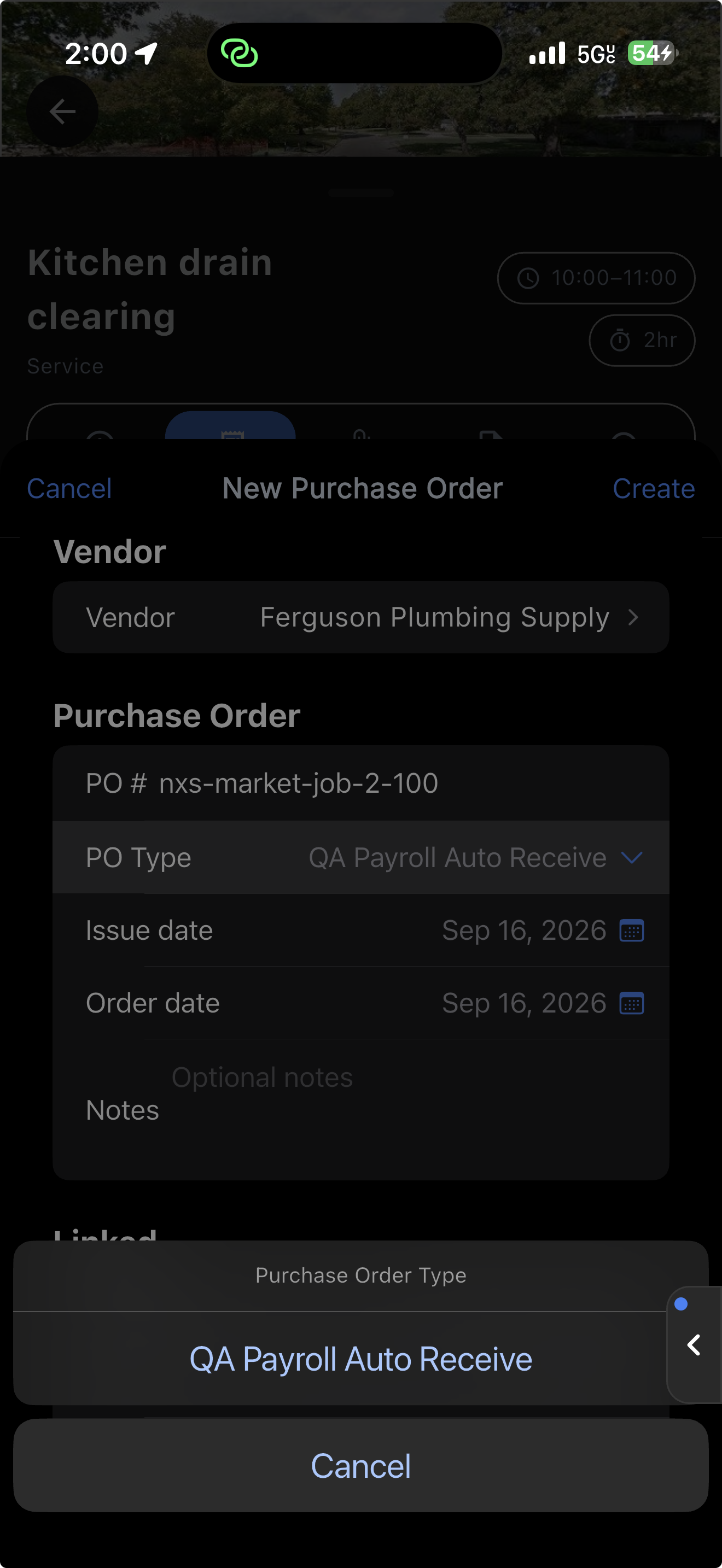
Give the office a purchase it can identify and follow
A supplier order should tell the office which work it supports. Creating it from the mobile job gives an authorized technician a direct path from the diagnosis to the purchasing record. The office can manage purchasing and receiving with the supplier and job attached, instead of matching an isolated receipt to a customer after the fact.
Keep responsibility for the next action clear as well. Assign a task to check availability, confirm delivery, or prepare a return visit. That task supports the human handoff; a purchase order alone is not a promise that someone has arranged the appointment. Together, the records help a growing company coordinate the parts and people needed to finish the repair.
Coordinate the whole crew as the day changes
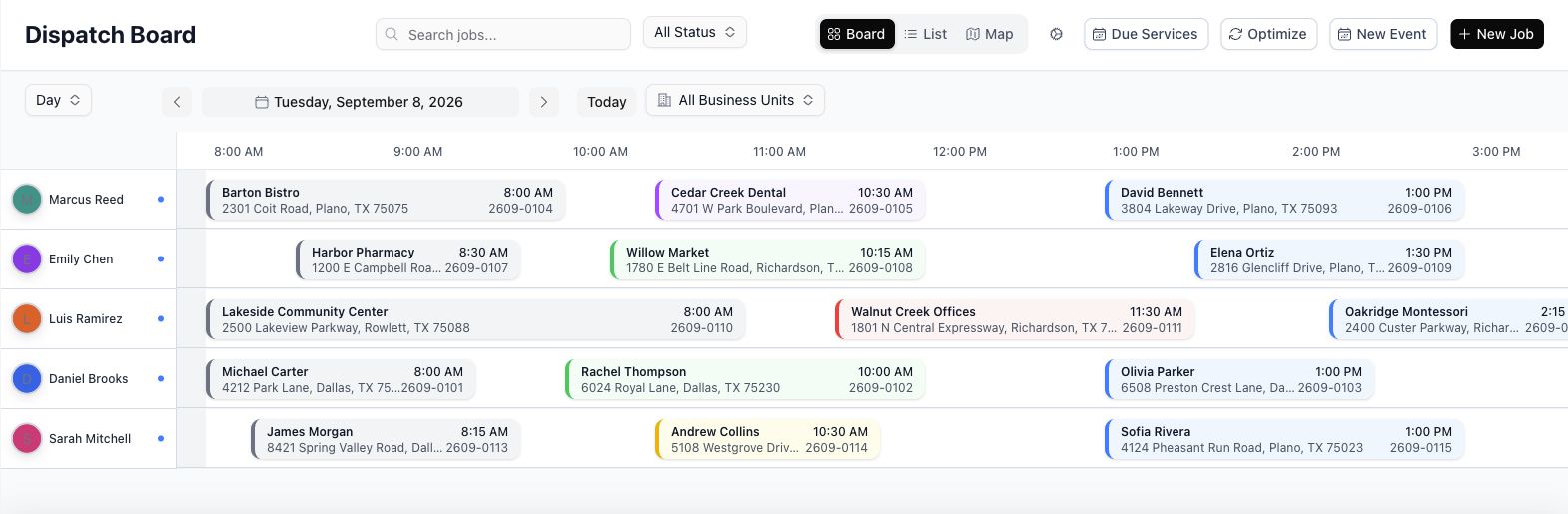
One technician is running late. Another needs help on an installation. A customer needs an urgent repair. Nexus brings technician assignments, arrival windows, appointment status, and routes into the dispatch workflow, so the office can adjust the day with the job details in front of it.
Keep the next assignment moving as the team and workload grow.
Explore dispatchPut job context behind changes to the schedule
A dispatch board should help the office respond when the day changes. Review technician assignments, arrival windows, appointment status, and routes with the job details available. When a repair needs more time or another technician, the person adjusting the schedule can work from the record of what is happening on site.
For a growing crew, the next appointment depends on more than an empty slot. The office may need to confirm the part has arrived or that the assigned technician has the repair context. Keep those preparation steps connected through purchasing and job tasks, then use dispatch to coordinate the visit. That gives the calendar an operating process behind it.
Take on larger jobs with the purchasing and billing to support them
As an installation becomes a multi-phase project, Nexus keeps the contract, phases, purchases, and progress billing together. Plan the work, track the material commitments, and bill against the project as it moves forward. Your service operation and larger projects can run in the same platform.
Room to grow into larger work while keeping the field and office coordinated.
Explore project management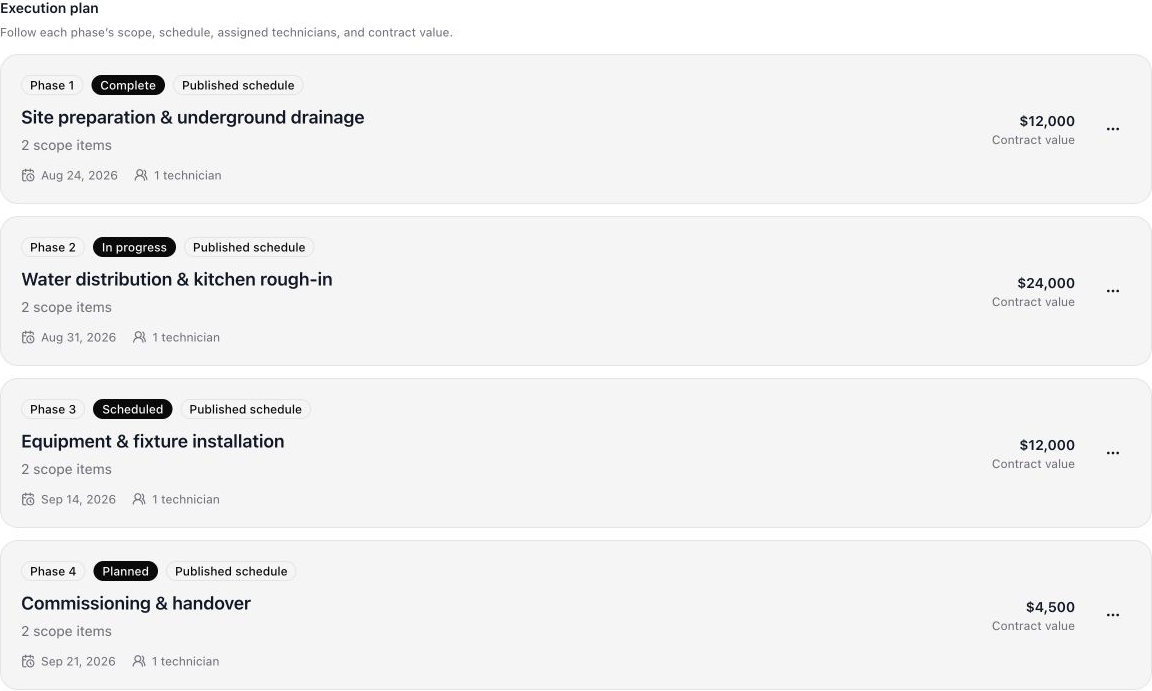
Give larger installations room beyond a single appointment
An installation with several stages needs a structure for scope, phases, material commitments, and customer billing. Nexus project management provides that structure alongside the service workflow. The office can plan the larger work while technicians continue handling appointments, recording job materials, and assigning follow-ups from the field.
Bring a phased job into the demo and follow one stage from its planned work through purchasing and progress billing. Review what the field user sees and what the project or office user needs next. The purpose is to support larger contracts without losing the practical detail that keeps daily service work moving.
The details behind the decision
Nexus vs QuoteIQ: the operational differences
QuoteIQ documents native inventory and purchase orders, so this decision deserves a closer look than a feature checkbox. Compare how the technician, office, and dispatcher complete the same job in each platform.
| The work | Nexus | QuoteIQ |
|---|---|---|
| Inventory and purchasing | Manage truck and warehouse inventory, capture materials from a mobile job, and connect purchasing to the work. | Documents native multi-location inventory and purchase orders on Elite and Max plans.QuoteIQ inventory management ↗ |
| Scheduling the crew | Coordinate technician assignments, appointment windows, status, and routes alongside job details. | Documents a drag-and-drop calendar, crew assignments, and recurring scheduling.QuoteIQ scheduling ↗ |
| The next action on a repair | Create a mobile job task with customer context, an assignee, and a due date; connect it to the parts and return-visit workflow. | During your demo, test who owns a parts request and how that request becomes a return appointment. Inventory availability alone does not answer that workflow question.QuoteIQ documented inventory workflow ↗ |
By Nexus · Reviewed September 16, 2026. Product views show Nexus mobile and office workflows. Access depends on your plan and staff permissions. Competitor details are based on the linked vendor documentation; package availability can change.
Put the difference to work
Look beyond the quote and test the unfinished job
Use the same job in both demos. Ask the people who will use the system to perform each step, then review the records they leave for the next person.
- Record the materials used on the first visit from the technician mobile app.
- Create the remaining parts order and assign a delivery check from the job.
- Bring the second technician into the return appointment with the original context available.
In Nexus, the point is to move responsibility and job detail together. Bring your dispatcher, a field technician, and the office person who handles purchasing so you can see the handoffs from each role.
Compare the cost of the operation you want to run
A monthly subscription is only one part of the decision. Start with the work your team needs to complete: dispatch, inventory management, purchase orders, mobile job tasks, and the billing process behind larger installations. Review which proposed plan covers those requirements, how staff access is priced, and what setup or connected products the workflow needs.
Nexus brings those operational capabilities into the same platform. Review the published Nexus plans, then use your walkthrough to confirm the setup for your technicians and office. Ask about permissions, training, import scope, communication usage, and payment-related charges before choosing a configuration. That gives you a cost comparison based on the system your company will actually use.
Include the time your team spends coordinating work today. Pick a recent repair and record how long the office spent finding its parts list, chasing the supplier, and arranging a return visit. Repeat the process in a demo or pilot. Use the observed difference to judge the potential value for your business, without assuming a generic savings percentage will apply to your crew.
Make room for the next stage
Put your next stage of growth on the job page
Bring a recently approved quote that took more than one visit to complete. See how Nexus connects the technicians, materials, purchasing, and follow-up work needed to deliver it.
Move your team onto a process they can follow
Start with your active customers, open jobs, unpaid invoices, and the inventory your team uses. In your Nexus walkthrough, discuss the records to bring across, technician permissions, and the first workflow to roll out. Give your team a practical starting point for using the new system.
Choose an initial workflow that crosses the field and office. For example, have a technician record materials on a repair, create the remaining purchase order, and assign a delivery check. Have the office follow that task and use the dispatch board to plan the return appointment. This lets the people using the system learn a complete piece of the operation together.
Before cutover, agree on which records will be imported, who will check them, and how staff will access historical information. Test a sample of customer and open-job records before moving the active workload. The aim is a clear starting point for the team and a practical way to expand into additional workflows as people become comfortable.
Nexus vs QuoteIQ: common questions
Why consider Nexus as a QuoteIQ alternative?
The pressure on a growing contractor shows up between appointments: a technician waiting for a part, a purchasing question with no job number, or a customer expecting a return call. Nexus keeps those details attached to the work. Technicians can record materials, create a purchase order with the right access, and assign a job-linked follow-up before they leave the site. Winning another quote should give your business capacity to grow, not another set of loose ends for the owner. When the job requires more than the originally planned visit, somebody has to record the diagnosis, arrange materials, update the schedule, and keep the customer informed. Nexus puts the technician’s part of that process directly on the mobile job: capture materials, create a purchase order when authorized, and assign a task with the customer and job already attached.
Can technicians handle parts and follow-ups from the mobile job?
Yes. Technicians can open material scanning from the Nexus mobile app, create and open purchase orders when their permissions allow, and create a task with the job and customer already attached. Give the task an assignee and due date so the office has a clear next action. The purchasing record and assigned task support the handoff before dispatch arranges another appointment.
Can Nexus support larger installations as well as daily service calls?
Yes. Nexus project management includes contracts, phases, purchasing, and progress billing alongside the service job workflow. That gives a growing contractor a way to structure larger work while continuing to coordinate technician appointments and material usage. In your walkthrough, review the setup and permissions for both the people managing the project and the technicians doing the field work.
What should we prepare before switching from QuoteIQ?
List the customer records, service locations, active work, equipment, inventory, and financial records your team needs to bring forward. Discuss available exports and the proposed import scope before setting a cutover date. Start by demonstrating your highest-priority workflow with a technician, dispatcher, and office user, then agree on training, responsibilities, and how historical records will remain accessible.